


recommended to use embed builder
The Welcome Setup system lets you configure an automated welcome message for new members you can always use the embed builder to build embed to your own style!
Permissions
To use any of thewelcome subcommands, you need the (manage_guild) permission
Command Overview
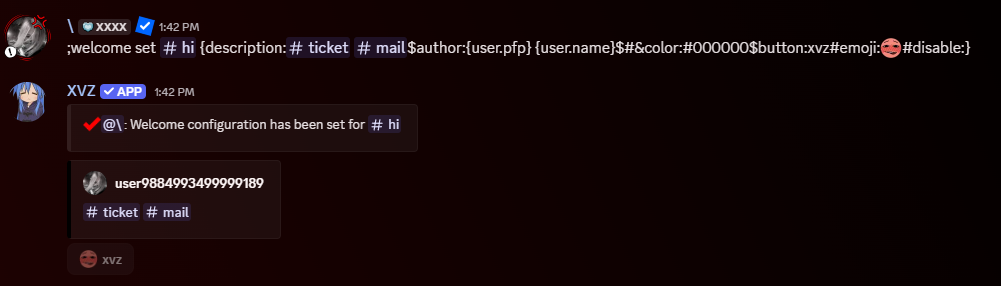
Set Welcome Message
Set a new welcome message for your server<#channel>— The text channel where the welcome message will be sent<raw>— The raw embed/message string that defines your welcome message
Reset Welcome Message
Remove the current welcome configuration from your server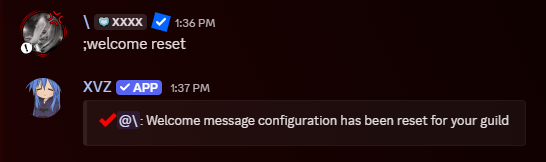
View Welcome Message
See preview of the currently configured welcome message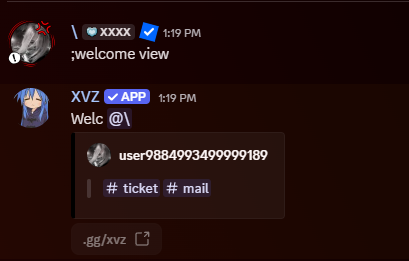
Variables
| Variable | Description |
|---|---|
{user.mention} | Mentions the new user |
{user.name} | Username only |
{user.tag} | Username + discriminator |
{user.id} | User’s ID |
{user.pfp} | URL to user’s avatar |
{guild.name} | Server name |
{guild.icon} | Server icon URL |
{membercount} | Current member count |
{xvz.name} | Bot name |
{xvz.pfp} | Bot avatar URL |
Raw Embed Syntax
Available Fields:message:— Plain text message contenttitle:— Embed titledescription:— Embed descriptionauthor:— Embed author text (optionally with icon URL)thumbnail:— Embed thumbnail image URLimage:— Embed image URLfooter:— Embed footer text (optionally with icon URL)&color:— Embed color in HEX (e.g.,&color:#FF0000)button:— Add interactive buttons (see below)

Buttons Syntax
Parameters:style#primary/style#secondary/style#success/style#danger/style#linkemoji:EMOJIurl:LINK(required for link buttons)disable:(disables the button)