> ## Documentation Index
> Fetch the complete documentation index at: https://docs.xvz.wtf/llms.txt
> Use this file to discover all available pages before exploring further.
# Voicemaster
> Create temporary voice channels which can be customized!
## Getting started
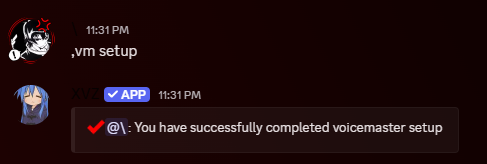
The first step to using **VoiceMaster** is to use the setup command
> The created channels can be moved and renamed!
 ***
## What is the interface channel?
The `#interface` channel will contain an embed with buttons that allow members to control their temporary voice channel. This channel should be locked!
***
## How to?
1. **Enable Voicemaster**\
Make sure you have the `manage_guild` permissions. Use the setup command
2. **Use the Interface Channel**\
Use the buttons in the interface channel to lock, unlock, ghost, reveal, disconnect, etc in your temporary channel
> Need more help? [Join our Discord](https://discord.gg/xvz)
***
## What is the interface channel?
The `#interface` channel will contain an embed with buttons that allow members to control their temporary voice channel. This channel should be locked!
***
## How to?
1. **Enable Voicemaster**\
Make sure you have the `manage_guild` permissions. Use the setup command
2. **Use the Interface Channel**\
Use the buttons in the interface channel to lock, unlock, ghost, reveal, disconnect, etc in your temporary channel
> Need more help? [Join our Discord](https://discord.gg/xvz)